
What is Physically Based Rendering (PBR)?
CGI Visualization to Perfection
Danthree Studio turns complex 3D tech into high-converting marketing assets. Get high-end quality for your brand.
Discuss your projectWhat is Physically Based Rendering (PBR)?
Definition of Physically Based Rendering (PBR)
Physically based rendering (PBR) models light and materials using physical principles, including energy conservation and angle-dependent reflection. Parameters such as base color, roughness, and metalness describe the surface. Its appearance also depends on lighting, geometry, the renderer, and color management. PBR helps with material matching, but product references and creative decisions remain essential. An example of our work with materials and light: kitchen visualization for LEICHT IDEA.
The Most Important PBR Maps
- Albedo / Base Color: Describes the base color without baked-in lighting. In the Metalness workflow, Base Color refers to the color of the reflection for metals.
- Normal map: changes surface normals for lighting calculations. It adds no geometry and does not change the silhouette.
- Roughness Map: controls the microscopic roughness and thus the width and sharpness of reflections.
- Metalness / Metallic: Distinguishes between metallic and non-metallic surfaces. For a uniform material, a constant value may suffice instead of a texture.
- Ambient occlusion (AO): approximates occlusion caused by neighboring geometry. AO is optional and does not replace a complete lighting calculation.
The Adobe Substance 3D PBR Guide explains the basics and the two common PBR workflows.
Examples of PBR Maps
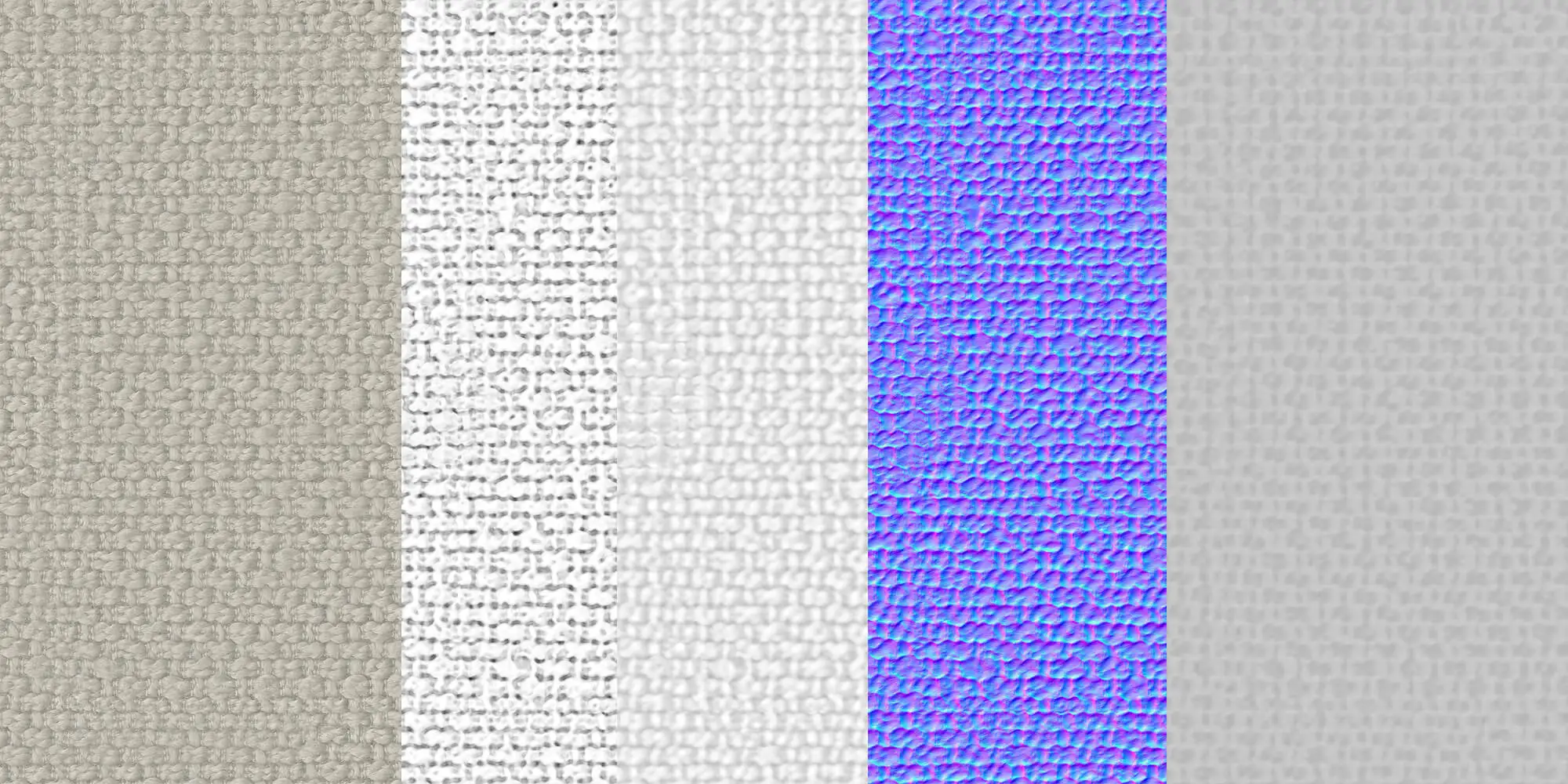
Which PBR map do I need for rendering?
There is no required set of four or five texture files. Which maps are needed depends on the material, level of detail, and rendering system. Uniform properties can often be specified as values in the shader.
| Material Type | Key Parameters | Depending on the detail needed | Keep this in mind |
|---|---|---|---|
| Brushed Metal | Base color, metalness, roughness | Anisotropy; normal mapping or geometry for visible detail | Check the brushing direction and reflections under appropriate lighting |
| Leather / Fabric | Base Color, Roughness; usually nonmetallic | Normal, Displacement; Sheen, depending on the material | Check weave scale, folds, and sheen against the reference |
| Glass | Transmission, IOR, Roughness | Absorption, material thickness, and, if applicable, volume | Alpha transparency does not replace light refraction |
| Varnished wood | Base Color, Roughness; non-metallic | Normal mapping and a separate coat layer in the shader | Adjust the wood grain and the gloss of the finish separately |
More information on textures and material creation: Material & Surface Digitization as well as Surface Visualization.

From Technical Term to Visual Experience
We don't just use these technologies; we master them. See how we create photorealistic worlds for leading brands.
View WorkReal-World Examples & Media
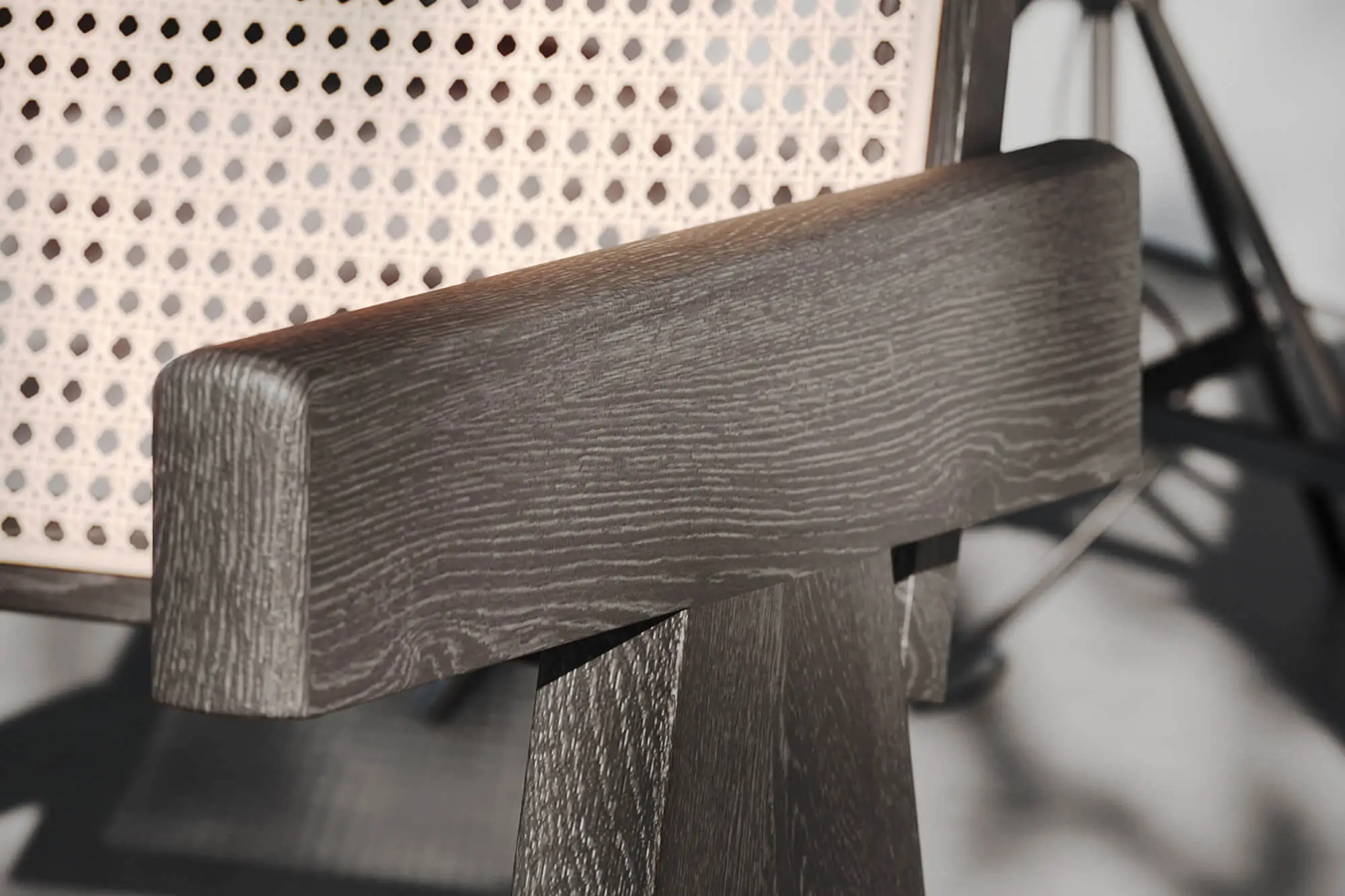
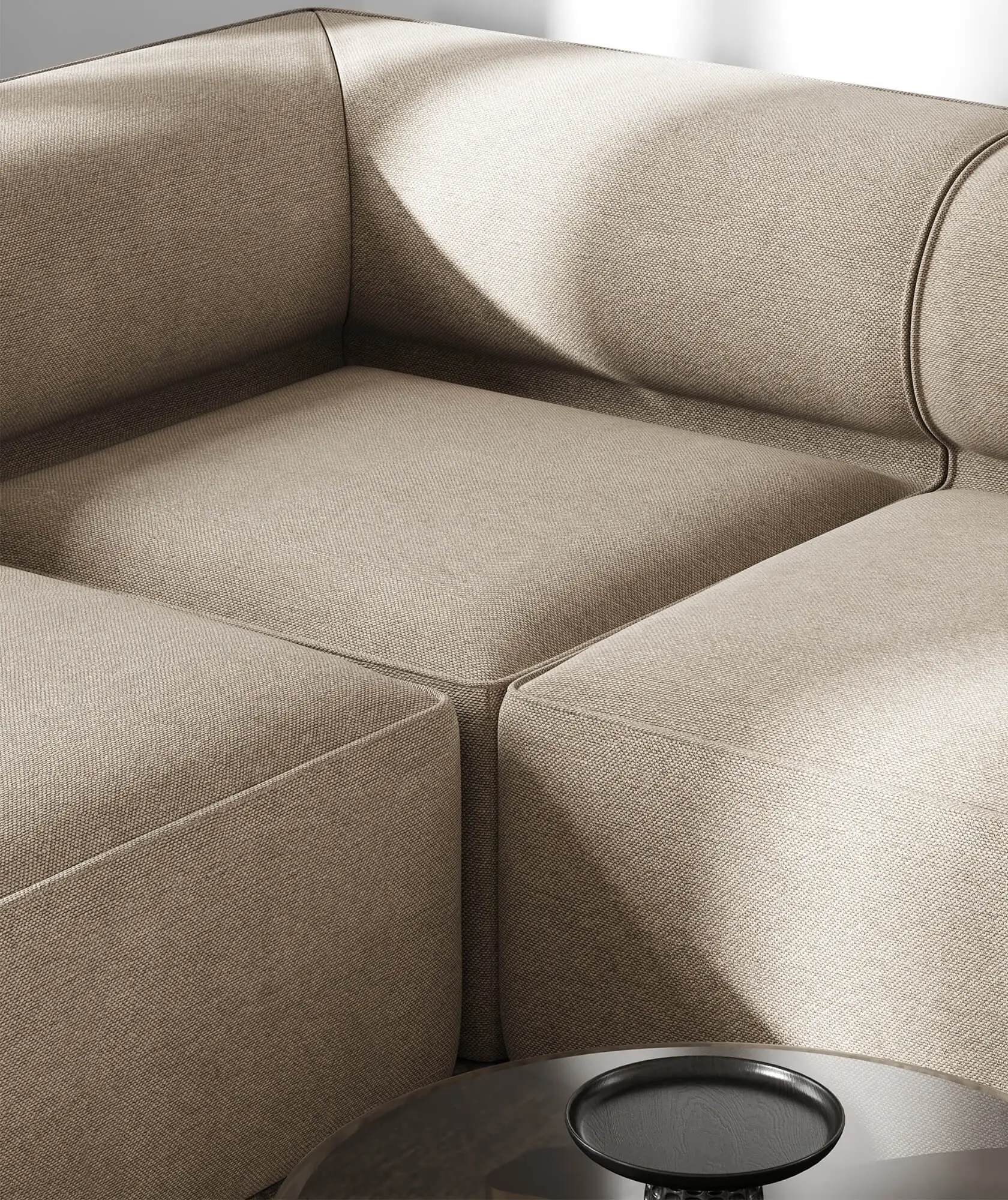
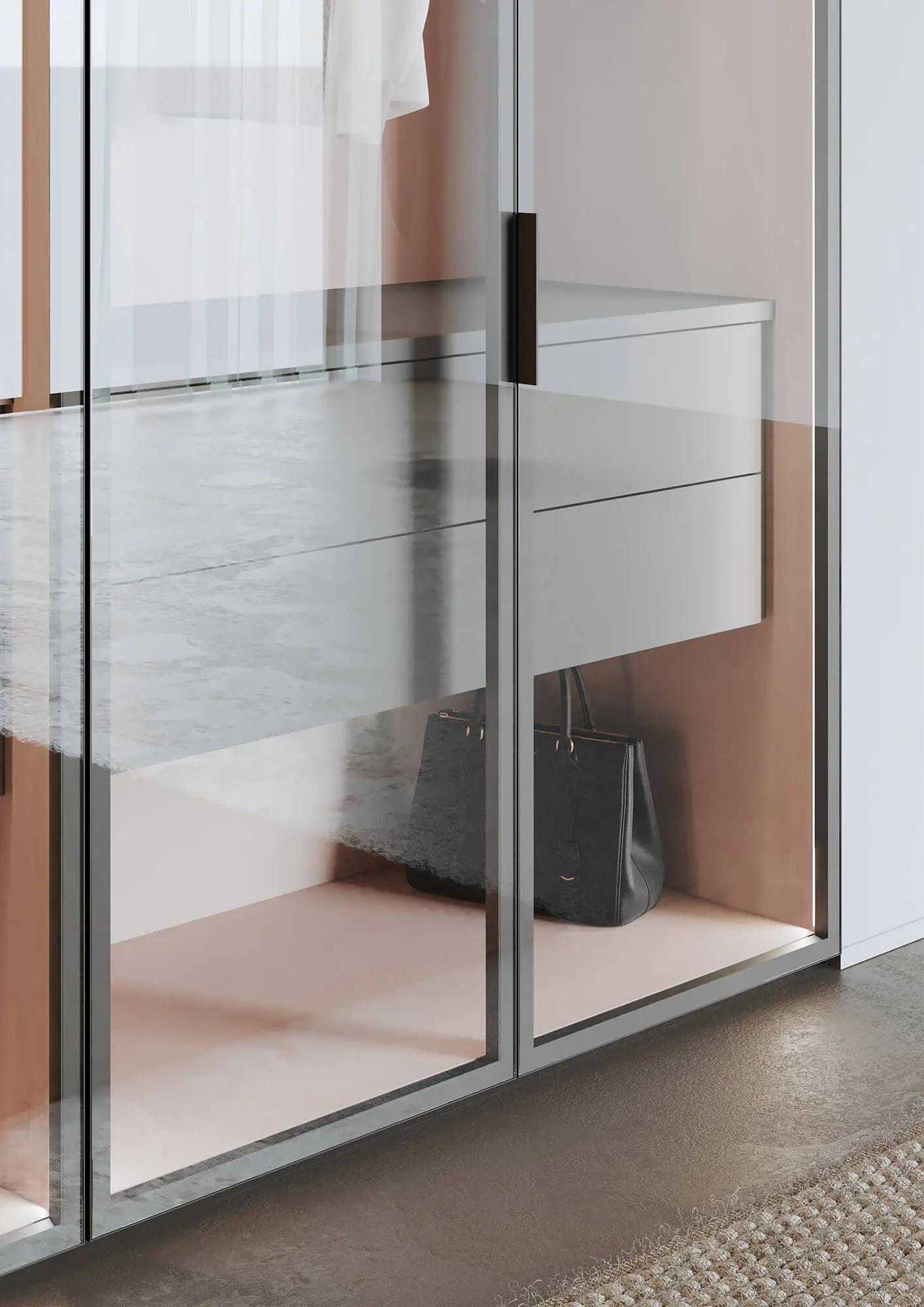
Wood, fabric, and glass have different material requirements. The following images show what to look for when matching materials. A finished rendering alone does not reveal which maps or shaders were used.
Workflow at Danthree
- Material references: Depending on the surface, we work with material samples, photographs, scans, or procedurally generated textures.
- Map Creation: We create the textures required for the material and its intended use.
- Look Development and Shaders: We fine-tune the material parameters in the render engine.
- Test renders: We check scale, color, and reflections against the references under the intended lighting conditions.
- Coordination and Reuse: Which image data or materials are provided and later reused depends on the agreed-upon scope of the project.
More about the process: 3D visualization studio and 3D modeling.
Benefits for Brands & Marketing
- A material setup you can review: Separate parameters make it easier to adjust color, roughness, and surface detail.
- A reusable foundation: Material data can support additional images when the renderer, scale, and intended use are compatible.
- A result you can check: References and test renders help identify and correct material discrepancies.
- Multiple output channels: Whether for the web, print, or real-time applications, we evaluate the specific requirements for textures, shaders, and color management.
Metalness/Roughness and Specular/Glossiness
The terms alone do not indicate whether a shader operates based on physical principles. Both workflows can implement PBR. The key factors are the material model, appropriate values, and the implementation in the renderer.
| Aspect | Metalness/Roughness | Specular/Glossiness |
|---|---|---|
| Basic Principle | PBR Workflow with a Metallic Mask and Roughness | Can also be used as a PBR workflow; reflection color and smoothness are described separately |
| Material Color | Base Color: diffuse color for nonmetals, reflective color for metals | "Diffuse" describes the diffuse color; "Specular" describes the reflection |
| Roughness | Roughness describes microscopic roughness | Glossiness describes smoothness; the conversion depends on the shader |
| Transfer between systems | The basis of the glTF 2.0 material model; extensions depend on the material | Check for support in the target system; conversion is not always lossless |
More Fundamentals of Lighting & Rendering: Ray Tracing
FAQ - What is Physically Based Rendering (PBR)?
What is the difference between PBR and traditional shading?
PBR bases lighting and material calculations on physical principles. Specular/glossiness is not inherently an alternative to PBR: this workflow can also implement PBR. Map names alone establish neither accuracy nor realism. The Adobe PBR Guide explains both workflows.
What are the minimum maps I need for PBR?
There is no universally required number of textures. A metalness/roughness workflow describes base color, metallic, and roughness; constant values may be enough for uniform properties. Normal, AO, and other maps are added as needed. The glTF 2.0 specification distinguishes between material factors and optional textures.
Can I convert existing materials to PBR?
Existing materials can often be reused or adapted. However, a diffuse map with baked-in light is not automatically a suitable base color map. Similarly, specular/glossiness cannot be transferred losslessly for every material simply by renaming or inverting it. Check the result in the target renderer against the product reference.
Where can I get PBR textures?
Possible sources include material digitization, photographic references, procedural generation, and texture libraries. Check usage rights, scale, resolution, and how the maps work together. For product-specific surfaces, we can discuss material digitization using your references.
Why doesn't the same PBR material look the same everywhere?
Lighting, exposure, color management, shaders, and geometry all affect the final result. Support for material properties may also vary between applications. PBR provides a common foundation, but does not guarantee identical images. Test the material on the actual target system where it will be used.
Is transparency sufficient for a PBR glass material?
No. Alpha transparency and light transmission with refraction are different properties. For glass, transmission, refractive index, roughness, material thickness, and absorption may be relevant. Which of these are available depends on the shader and renderer. The Khronos overview of PBR in glTF lists the corresponding material extensions.